A customer can browse a website, sign in on a mobile app, and update their details through a service team.
Each interaction leaves information in a different place. Turning those pieces into a useful customer experience takes more than moving them into one platform: the data needs a consistent structure, reliable identity links, and clear rules for how it can be used.
This map is how I organize the main ideas behind Adobe Experience Platform (AEP). It starts with the business purpose, follows the data through the platform, and ends with the experience a customer receives.
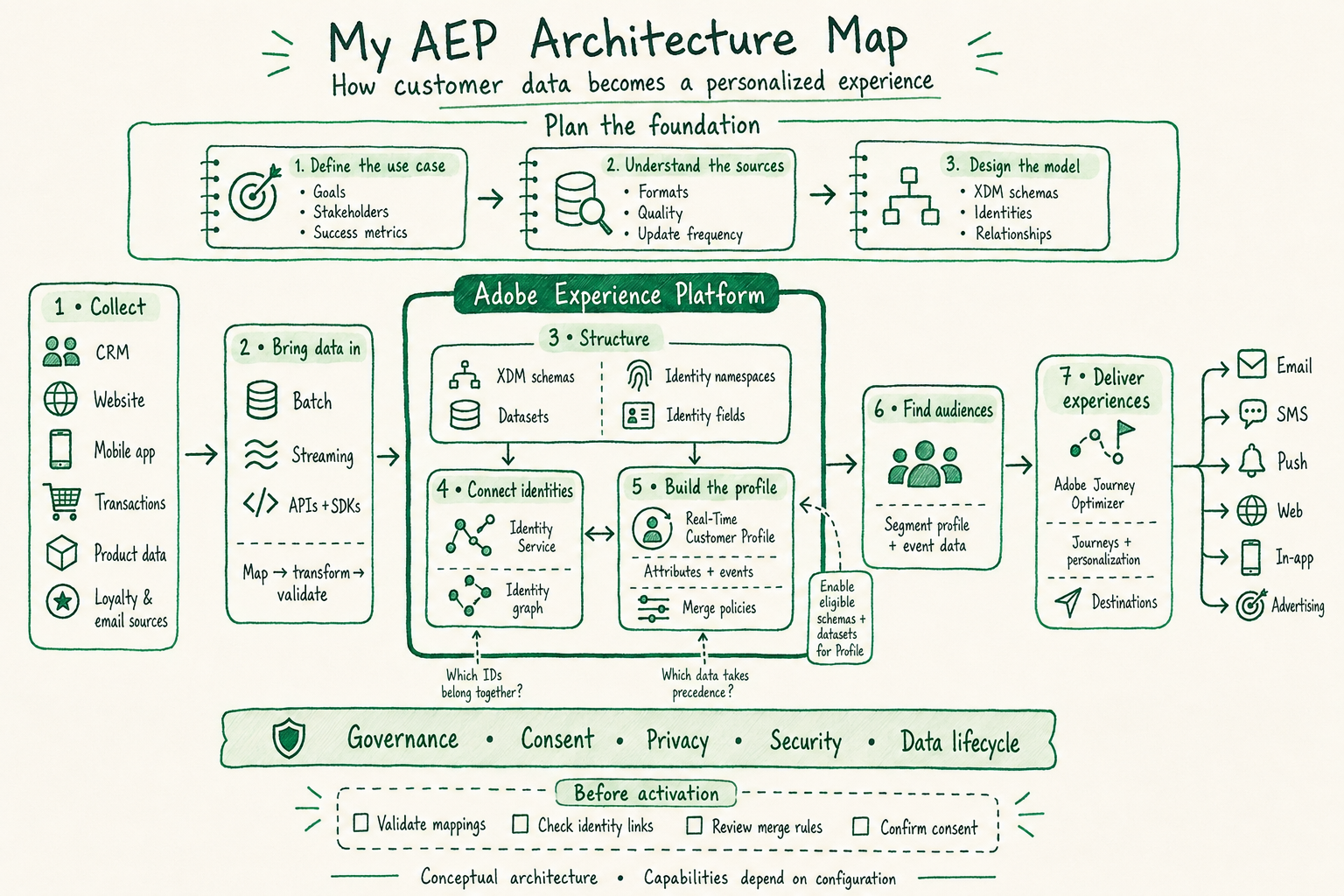
The drawing is a conceptual map. Its arrows show relationships between capabilities, rather than a strict deployment sequence. For example, a target schema and dataset must be prepared before data is ingested into them. Audience creation belongs to AEP even though that box sits outside the central outline in this illustration.
Throughout the article, imagine a fictional business that wants to help customers finish an online application. Its website records application activity, its CRM holds customer details, and its messaging system delivers reminders. The example illustrates design decisions; it does not describe any particular company's implementation.
Plan the foundation
1. Define the use case
Start with the outcome. “Send a reminder to an eligible customer who started an application but has not completed it” gives the team a concrete problem to solve.
Agree on what counts as a start, what counts as completion, how long to wait, and which customers should be excluded. Choose a success measure, such as completed applications, and identify the people responsible for data, audience logic, messaging, and measurement.
The deliverable is a short use-case definition with clear acceptance criteria. Without it, a technically successful data pipeline can still produce the wrong experience.
2. Understand the sources
Work backward from the use case to identify the necessary data. The application website might supply events, the CRM might supply a customer identifier, and another system might hold communication preferences.
For each source, document its owner, identifiers, field meanings, refresh frequency, and known quality issues. Ask whether a missing value means “unknown,” “not applicable,” or an upstream error. Also check how late a completion event can arrive: that delay affects whether a reminder is appropriate.
The deliverable is a source inventory that explains both what the data contains and how much confidence the team can place in it.
3. Design the model
Decide how those business concepts will be represented. Keep a person's current attributes separate from events that happened at a particular time. An application status and an application-submitted event answer different questions.
In this example, identify which source owns customer details, how an application is referenced, and which events will describe progress. Record any relationships needed between entities. This design becomes the contract for the implementation rather than leaving every source team to choose its own interpretation.
Step 1: Collect the right information
The left side of the diagram lists possible sources: CRM, website, mobile app, transactions, product data, loyalty, and email systems. A specific use case may need only a few of them.
For the application reminder, useful inputs could include a customer identifier, an application identifier, start and completion timestamps, and the applicable communication preferences. Define the event names and required fields before instrumenting the website or app.
Test the business meaning of the collection. Does “application started” fire when a person actually begins the form, or merely when the page loads? That distinction changes who enters the audience. The output of this step is a set of well-defined records and events that downstream teams can interpret consistently.
Step 2: Bring data in
AEP supports batch and streaming ingestion. Batch fits groups of records delivered together; streaming fits records sent as activity occurs. Source connectors, APIs, and SDK-based collection provide different paths into the platform. The appropriate path depends on the source and the use case. Adobe's ingestion overview ↗
In the fictional example, CRM data could arrive in a scheduled batch while application events arrive through a streaming path. Mapping connects source fields to the target model; transformations align formats and values; validation checks the result.
For instance, a source field called customer_number may map to a custom customer ID field. An event timestamp should retain its intended time zone. Inspect failed records and verify that accepted data reached the expected dataset. Successful transport alone does not establish that a profile or audience is ready.
Step 3: Give the data a shared structure
XDM, or Experience Data Model, provides a consistent way to describe data. A schema defines its structure; a dataset holds records that conform to a schema. Classes establish the model's behavior, while field groups contribute reusable fields. Profile attributes commonly use XDM Individual Profile, and timestamped activity uses XDM ExperienceEvent. Adobe's schema composition guide ↗
For our example, model customer attributes separately from application activity. Use field names whose meaning will remain clear to someone who did not build the integration.
Identity configuration is another part of the structure. A namespace gives context to an identifier: 12345 in a customer ID namespace is not automatically the same identity as 12345 in a different namespace. Mark the appropriate identity fields and associate them with the intended namespaces. Adobe's Identity Service implementation guide ↗
Relationships can connect related entities where the chosen model and use case support them. They should express a deliberate data relationship, rather than serve as a substitute for customer identity design.
Step 4: Connect identities
Identity Service connects identifiers through identity relationships and represents those links in an identity graph. The graph helps establish which identifiers belong together; it is not itself the full customer profile. Adobe's Identity Service overview ↗
Suppose a visitor begins with a browser identifier and later signs in. A correctly instrumented interaction can provide the relevant browser and customer identifiers together. Whether the expected link is formed depends on the actual payload and identity configuration—it should be verified with test data.
Check both expected links and unexpected ones. A shared device, a reused placeholder ID, or an incorrectly populated identity field can create misleading connections. For this example, a useful test traces one fictional customer from anonymous browsing through authenticated application activity and confirms that unrelated customers remain separate.
Step 5: Build the customer profile
Real-Time Customer Profile combines eligible customer information into a unified view of attributes and events. Enable the appropriate schemas and datasets for Profile when they need to contribute to this capability. Data ingested into AEP does not automatically become Profile data. Adobe's Profile overview ↗
Merge policies determine how profile fragments are combined and which data takes precedence. Identity links answer which identifiers belong together; merge policies govern the resulting profile view. They are not a general retention or time-to-live setting. Adobe's merge policy overview ↗
In our example, the intended profile might combine customer attributes with application activity. If two sources disagree on an attribute, define the appropriate precedence and test the result. “Real-time” should not be interpreted as zero delay across ingestion, profile processing, audience evaluation, and delivery.
Step 6: Find the audience
A segment definition expresses the rules for membership; an audience is the resulting group. AEP Segmentation Service can use Profile attributes and events to identify that group. Evaluation can be batch, streaming, or edge, with eligibility and behavior depending on the definition and configuration. Adobe's Segmentation Service overview ↗
For this example, the business rule could be: customers who started an application within the chosen window, have no corresponding completion, and meet the reminder's eligibility requirements. Matching events to the same application matters when a customer can have several applications.
Write test cases before trusting an audience count. Include a customer who completed, one who has two applications, one whose completion arrives late, and one who is ineligible for contact. A plausible total can hide incorrect membership.
Step 7: Deliver the experience
Adobe Journey Optimizer uses platform data to support personalized journeys and campaigns. A journey can coordinate conditions, timing, and actions around a customer experience. Audience-driven activation is one pattern; this diagram does not imply that every journey must begin with an audience. Adobe's Journey Optimizer introduction ↗
AEP destinations provide integrations for sending supported data to downstream systems. The destination determines details such as accepted identities, mappings, and delivery behavior. Exporting an audience and orchestrating a message are related but distinct activities. Adobe's destinations overview ↗
For the reminder example, define when to send, what to personalize, and when to suppress or stop the experience. Check for completion again at the appropriate point before delivery. Email, SMS, push, web, in-app, and advertising are possible activation surfaces across the ecosystem; each needs the relevant product capabilities and configuration.
The foundation beneath every step
The green ribbon under the diagram represents governance, consent, privacy, security, and data lifecycle. These decisions influence collection, storage, audience design, and activation.
AEP Data Governance uses data usage labels, policies, and enforcement capabilities to help control data use. Those controls require configuration; displaying a governance layer in a diagram does not enforce anything. Adobe's Data Governance overview ↗
For our example, document how communication preferences reach the platform, where they affect eligibility, who can access the data, and how long the underlying records are needed. Keep operational ownership clear so a source change or processing failure has someone responsible for resolving it.
Before activation
Prove the flow with test customers.
- Validate mappings: Trace representative source records into the intended fields and datasets. Check timestamps, missing values, and rejected records.
- Check identity links: Inspect known test identities and confirm that the graph connects only the intended identifiers.
- Review merge rules: Create a controlled conflict between sources and verify that the resulting profile follows the chosen policy.
- Confirm consent: Test an eligible customer and an ineligible customer through the configured audience and delivery controls.
Then run the application example from start to finish. Confirm the start event, the profile view, audience membership, and the intended action. Repeat with a completion event and verify that the reminder is suppressed. This gives each box in the architecture a concrete behavior to demonstrate.
The value of the map is that it makes dependencies visible. A delivery problem may begin with an event definition; an audience problem may begin with an identity link. Following one customer through the entire flow turns an abstract architecture into something that can be explained, tested, and improved.